Connect Heilo to your stack with the REST API and webhooks
Read chats and reply from your own code, keep contacts in step with your user database, and get signed events the moment something happens in Heilo.
开发者4 分钟阅读
Right after launch, the Inbox is all you need. A few months later, support starts to touch everything else: your CRM wants to know who wrote in, your back office should show a customer's last chat, and a bug reported in a chat should become an issue in your tracker.
Heilo has two pieces for that. The REST API lets your code call Heilo: read conversations, reply, update contacts and tickets. Webhooks work the other way around: Heilo calls your server the moment something happens. Both come with Pro ($12/month) and Business, and with the 14-day free trial.
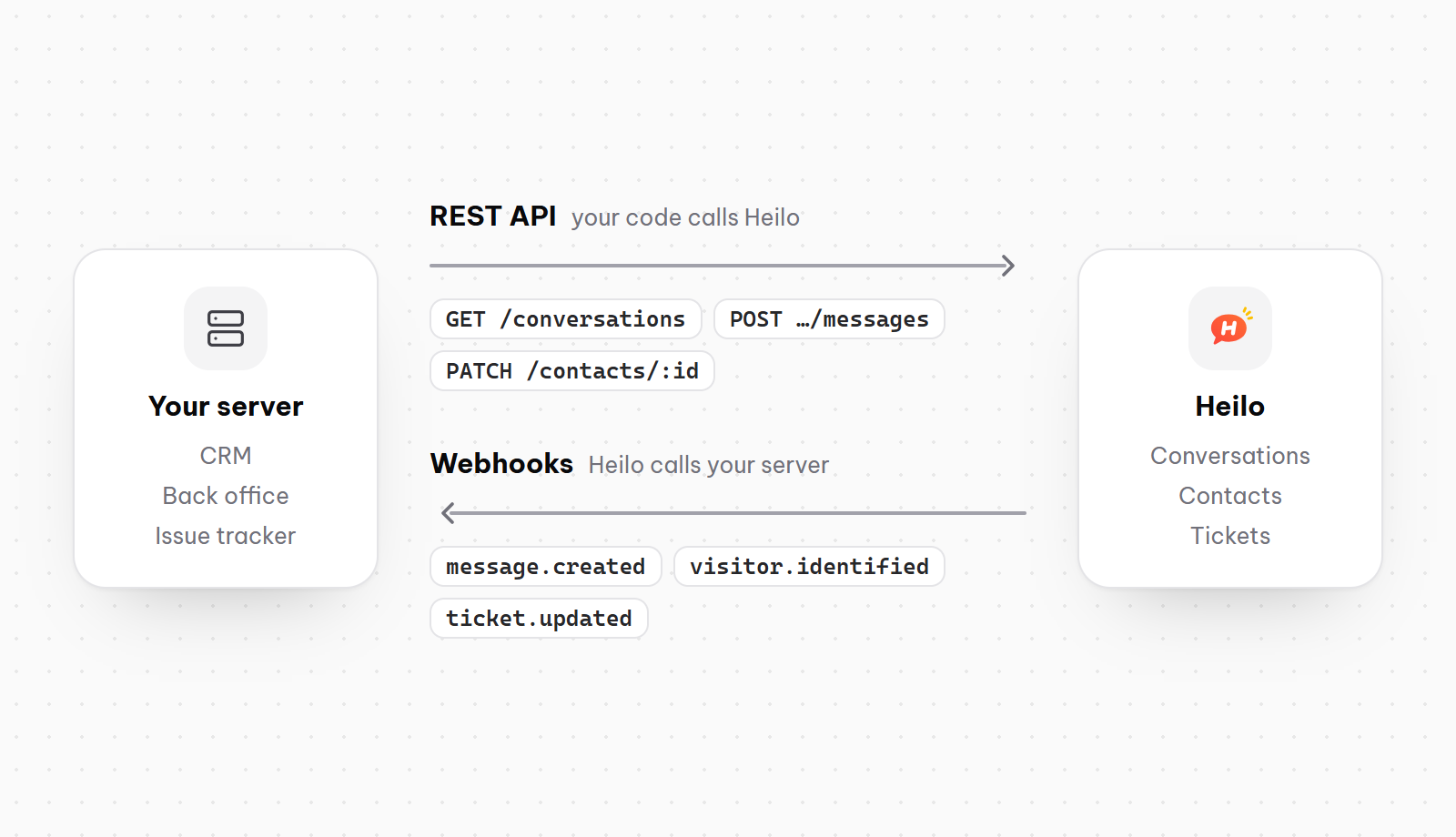
Many integrations use both: a webhook says something happened, and the REST API reads the rest or answers back.
API keys and limits
Create a key under Integrations → REST API: give it a name such as "Internal CRM" and press Create key. The full key is shown once. Heilo keeps only a fingerprint of it, so copy it right away into an environment variable on your server. A key belongs to the workspace, not to the person who made it, and Revoke stops it at once.
- Send it as
Authorization: Bearer <key>with every request. - Keys are for servers only. A key can read every chat in the workspace, and the API doesn't answer browsers.
- Each key gets 120 requests a minute. Past that, the answer is
429with aRetry-Afterheader that says how long to wait.
The same key also works for the MCP server, when you'd like your AI assistant to read your chats.
What the REST API can do
The base URL is https://app.heilo.chat/api/v1, and answers are JSON with the result in data.
- Conversations: list them, read one with its latest 200 messages, reply to the visitor as a teammate, close or reopen.
- Contacts: list them with the same filters as the Contacts page (including your own user id for signed-in customers), and update name, email, phone, notes, labels and custom fields.
- Tickets: list, create and update them, add internal comments, and email the customer when a ticket is solved.
Everything you do through the API shows up in the Inbox at once and sends the same webhooks as the dashboard. A reply looks like this:
curl -X POST "https://app.heilo.chat/api/v1/conversations/conv_…/messages" \
  -H "Authorization: Bearer $HEILO_API_KEY" \
  -H "Content-Type: application/json" \
  -d '{"body": "Thanks Lily, we reset your sign-in. Please try again.", "agentEmail": "[email protected]"}'
With agentEmail the reply carries that teammate's name and photo. A few things are left out on purpose: the API can't start a conversation, send files or delete anything.
Webhooks for events as they happen
Open Integrations → Webhooks, go to Custom webhook, enter your Endpoint URL (https only), pick the Events and press Add webhook. Copy the signing secret to your server, then press Send test to send a ping and see the answer right away. Each endpoint shows its last delivery, so you notice when something fails.
| Event | When |
|---|---|
conversation.created | A new conversation starts |
conversation.assigned | A conversation gets a new assignee |
conversation.closed, conversation.reopened | A conversation is closed or reopened |
conversation.rated | A visitor gives or changes an after-chat rating |
message.created | Any new message, except internal notes |
visitor.identified | A visitor's name, email or phone arrives or changes |
contact.updated | A contact's details, labels or custom fields change |
ticket.created, ticket.updated | A ticket is created or changes |
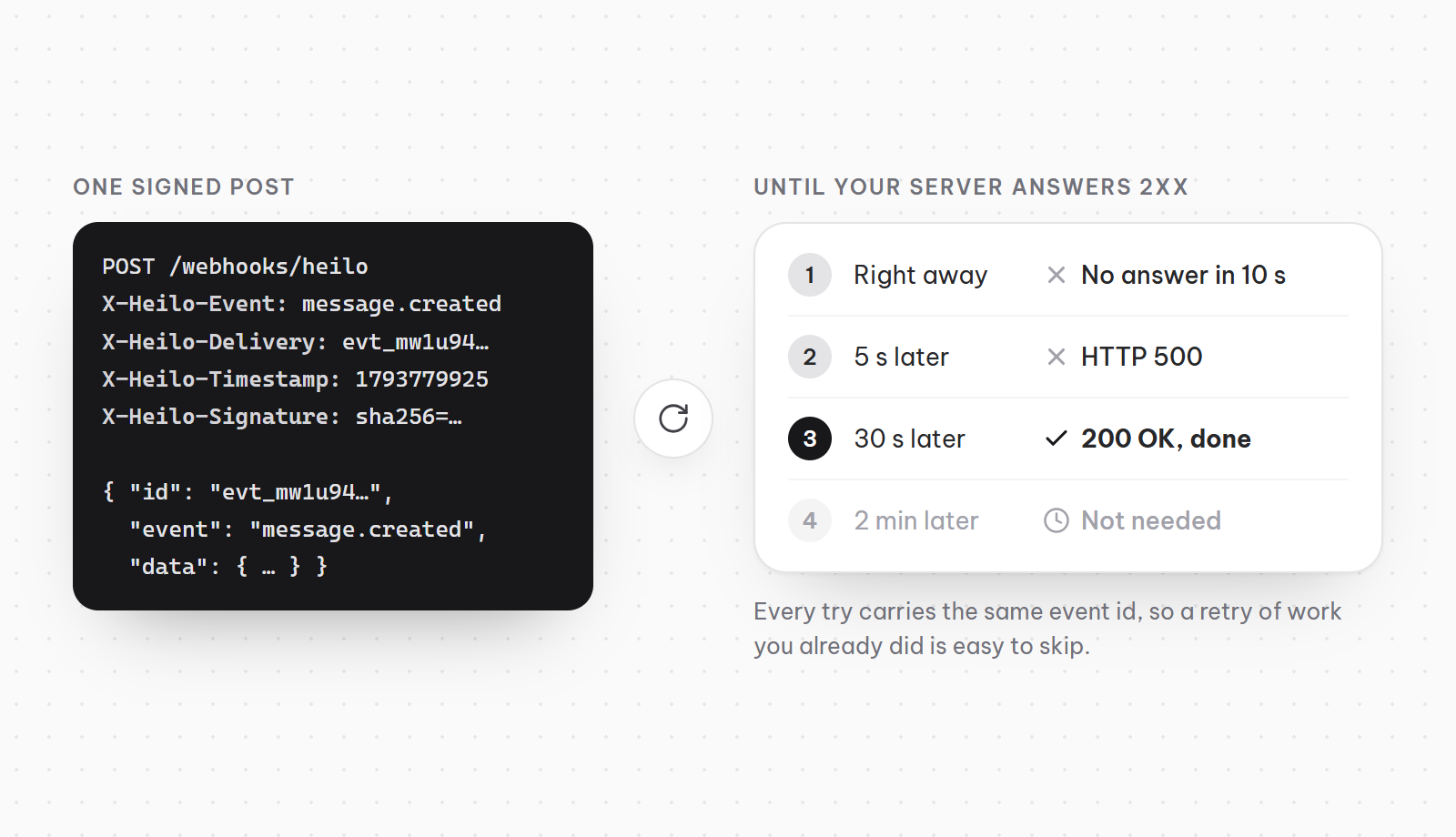
Each event is one JSON POST, signed with HMAC-SHA256 in the X-Heilo-Signature header. Answer any 2xx within 10 seconds. If you don't, Heilo tries again after 5 seconds, 30 seconds and 2 minutes.
Zapier, Make and n8n work too: paste their webhook URL as the endpoint. And if all you want is a ping in your team chat, the same page has ready-made alerts for Telegram, Slack, Discord and Microsoft Teams, no code needed.
A receiver that stays calm
- Check the signature on the raw body. Sign the
X-Heilo-Timestampvalue, a dot and the exact bytes you received, then compare. Refuse timestamps more than 5 minutes off. - Expect duplicates. A retry carries the same event
id. Remember the ids you've handled and answer200without doing the work twice. - Don't rely on order. Use
createdAt, or fetch the current state from the REST API when it matters. - Skip your own changes. A reply sent through the API comes back as
message.createdfrom an agent, and a contact you updated ascontact.updatedwithsource: "api". Filter those so nothing loops. - Answer fast. If the work takes longer, queue it and answer first.
In Node.js the signature check is a few lines:
import crypto from 'node:crypto'

function isFromHeilo(rawBody, timestamp, signature) {
  if (Math.abs(Date.now() / 1000 - Number(timestamp)) > 300) return false
  const expected = 'sha256=' + crypto
    .createHmac('sha256', process.env.HEILO_WEBHOOK_SECRET)
    .update(`${timestamp}.`).update(rawBody).digest('hex')
  const a = Buffer.from(signature)
  const b = Buffer.from(expected)
  return a.length === b.length && crypto.timingSafeEqual(a, b)
}
The REST API guide and the webhooks guide list every field, and both Integrations tabs can copy their guide as Markdown for your AI assistant. A good first project: send new contacts to your CRM on visitor.identified, and push each customer's plan back with PATCH /contacts/:id, as described in contacts and custom fields.