Build your own chat UI with the Heilo Chat SDK
Put the chat inside your web app or mobile app with your own design. Conversations still land in the Heilo Inbox, and your team answers as usual.
Developers3 min read
The chat widget fits most websites: one line of code, and it stays out of your CSS. But sometimes the chat should feel like part of the product itself. A Help tab in your iOS app, a support panel inside your editor, a screen in your React Native app that matches everything around it.
That's what the Heilo Chat SDK is for. It gives you the customer's side of the chat as code: connect, send, receive, load earlier messages. You draw the interface however you like, and your team keeps answering from the same Inbox and the Heilo phone app.
Widget or SDK
Both feed the same Inbox, so the only question is who draws the chat.
| Chat widget | Chat SDK | |
|---|---|---|
| Setup | One line before </body> | Your own UI code |
| Look | Your color, font and position, Heilo's layout | Anything you design |
| Runs in | Websites and web apps | Web apps, iOS and Android (React Native), Electron |
| Plan | Every plan, Free included | Pro ($12/month) and up, and the free trial |
The two work well together. With the same identity tokens, a signed-in customer has one conversation, whether they write from the widget on your website or from your app.
A first connection
The SDK is one file with nothing else to install. Import it as a module from https://app.heilo.chat/sdk/heilo-chat.mjs, or load heilo-chat.js with a script tag to get window.HeiloChat. TypeScript types come with it. Your website id (ws_…) is under Websites & widget → your website → Install.
import { HeiloChat } from 'https://app.heilo.chat/sdk/heilo-chat.mjs'

const chat = new HeiloChat({
  websiteId: 'ws_…',
  // optional: your server says who the signed-in customer is
  identityToken: () => fetch('/api/heilo-token').then((r) => r.text()),
})

chat.on('message', (message) => render(message)) // your team, the bot and this customer
chat.on('connection', (state) => showState(state)) // 'connecting' | 'online' | 'offline'

await chat.connect()
const { messages } = await chat.history() // earlier messages, oldest first
await chat.send('Hi! Can I export my notes to PDF?')
Each part of your chat screen then comes from one call or one event, so you can build it piece by piece:
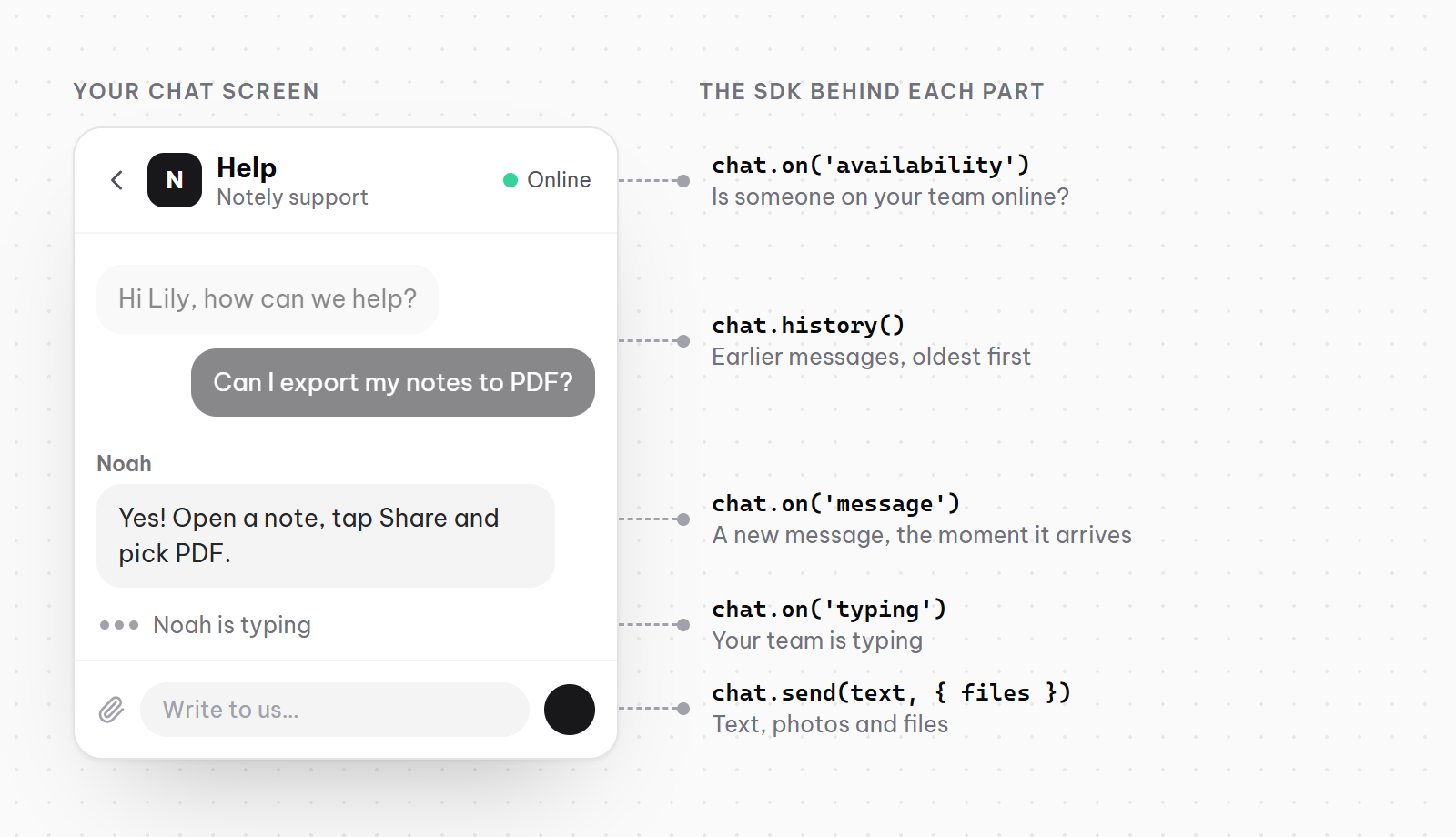
From there, add what your UI needs. chat.send('', { files: [file] }) sends photos and files, and chat.send(text, { replyTo: message.id }) quotes an earlier message. Next to typing and availability, the status event tells you when a chat was closed. chat.rate('good') saves the after-chat rating, chat.setFields() fills custom fields on the contact, and chat.logout() forgets the chat on that device when your customer signs out.
What the SDK handles for you
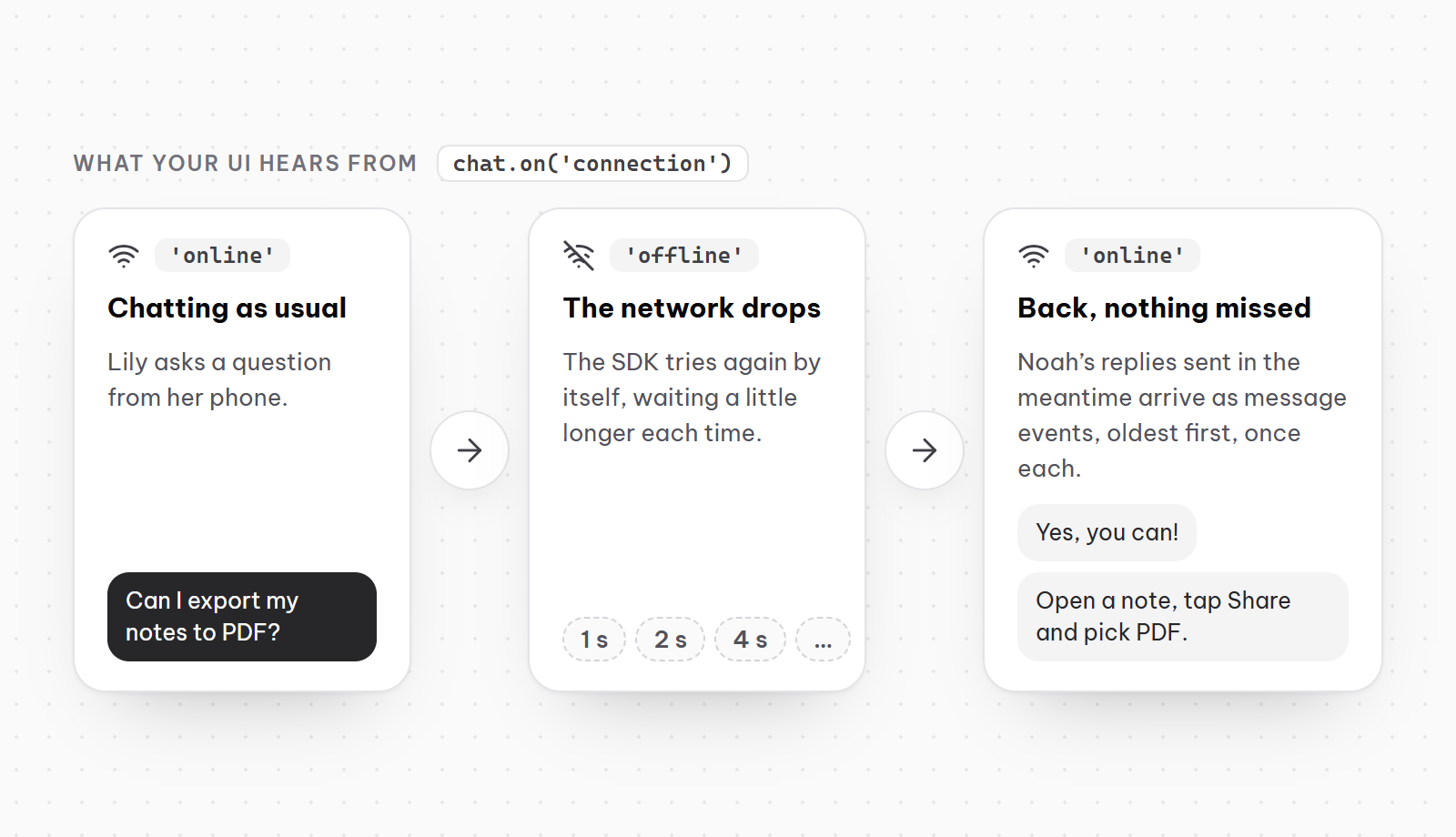
Mobile networks drop, laptops sleep, phones push apps to the background. After connect(), the SDK keeps the chat connected by itself: it reconnects after a drop, waiting a little longer each time, and delivers the messages that arrived meanwhile as normal message events, oldest first, each one once. The connection event tells your UI when to show that it's offline.
Sending is safe to retry. Each send carries an idempotency key, so a message sent again after a network error is never saved twice. When a session expires, the SDK asks your identityToken function for a fresh token and carries on.
For React Native, pass storage: AsyncStorage so the chat survives an app restart, and call chat.reconnect() when the app comes back to the foreground. Photos go up as a Blob from fetch(uri). If you'd rather not keep a socket open, realtime: false checks for new messages at an interval instead.
Keeping it safe
A chat inside your app holds real customer conversations, so the rules are strict and simple:
- The website id is a public key. It can sit in your app, and on its own it only opens a new anonymous chat.
- The identity secret stays on your server. Your server uses it to sign a short identity token (HS256, expiring within 24 hours, 10 minutes is plenty) for the customer who is signed in.
- A customer's history only opens with their own token or the session issued to them. A signed-in session lasts 7 days.
- Only signed-in customers, a switch on the Install tab, refuses anonymous chats in your app without touching your website widget.
- Allowed domains protect the browser side. Native apps send no domain, so they rely on identity tokens.
The token itself, step by step, is in identity tokens for signed-in users.
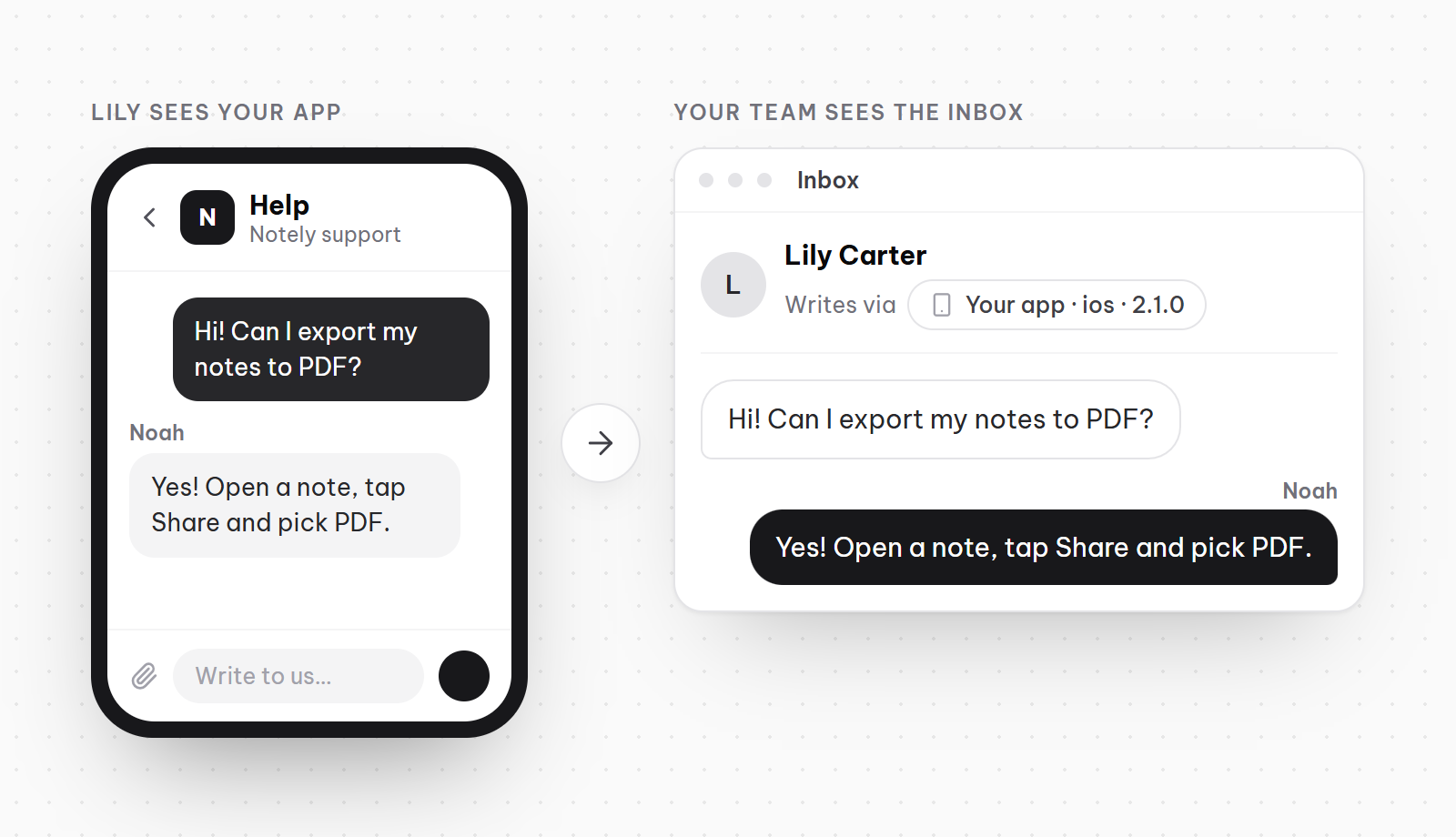
In the Inbox these chats show "Writes via: Your app" with the platform and app version you pass in meta, so your team knows where the customer is writing from. Images and files go both ways, just like in the widget.
The full reference, including the REST endpoints if you'd rather write your own client, is in the Chat Client API guide. To connect your back office instead, reading chats and replying as your team, see REST API and webhooks.