After-chat rating with one tap, and what to do with the result
When your team closes a chat, Heilo asks the visitor for a thumbs up or down and an optional comment. How it works, and how to use what you learn.
聊天插件4 分钟阅读
After a launch, most of what you learn about your support comes from the chats themselves. You can usually tell when a single chat went well. It's much harder to tell across a whole week, and harder again once a teammate starts answering too.
Heilo's after-chat rating asks one small question when a chat ends: "How was this chat?" The visitor taps a thumbs up or a thumbs down and can add a comment if they want to. It's on by default, on every plan, Free included.
This post covers what the visitor sees, where the answers show up on your side, and a calm way to act on them.
What the visitor sees
When your team closes a chat on your website, the widget shows a small card at the end of the conversation with two buttons, Good and Not good. One tap is enough. A comment box then appears ("Anything to add? (optional)") for anyone who wants to say more.
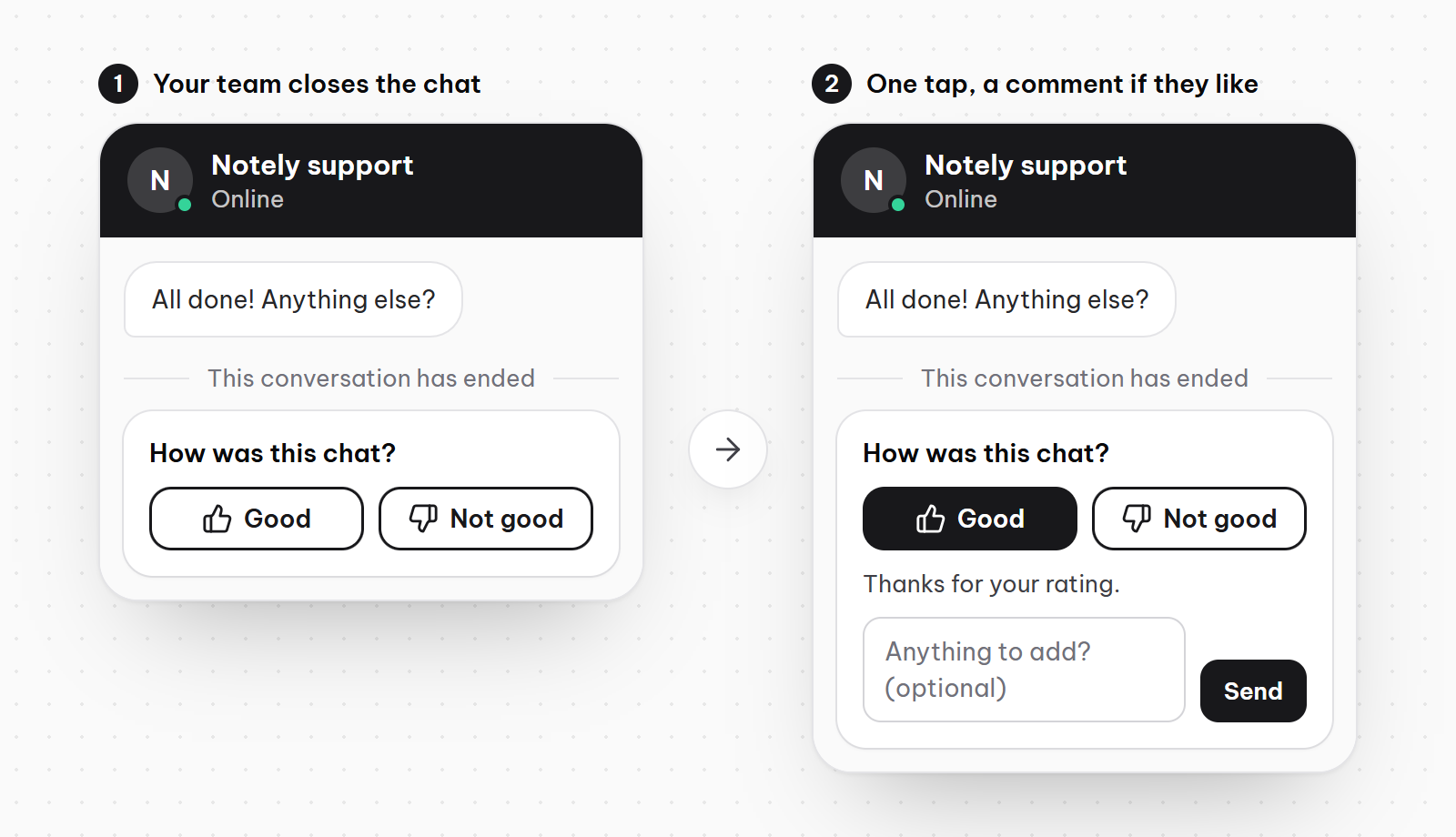
Why thumbs and not five stars? One tap means more visitors answer, and the result reads plainly as the share of chats rated good. Nobody has to wonder whether a 3 counts as happy.
A few rules keep it fair and quiet:
- One rating per chat. The visitor can rate within 7 days of the close, so someone who already left the page can still answer when they come back.
- They can change their mind, score or comment, for 24 hours after the first rating.
- Only chats your team closed are rated. A proactive message the visitor never answered isn't.
- Messenger and Instagram chats are never asked. The rating lives in your website widget.
- The question follows the widget language, so it's asked in any of the 13 languages the widget speaks.
Where the results show up
You don't need to go looking for ratings. They appear where you already work:
| Where | What you see |
|---|---|
| Inbox | A line at the end of the chat, like "Lily Carter rated this chat Not good", with the comment below it, and a small thumb in the conversation list |
| Analytics | A Satisfaction (CSAT) tile with the percentage of good ratings and how many there were, and a CSAT column in Agent performance |
| Team alerts (Pro and up) | Ratings posted to Telegram, Slack, Discord or Microsoft Teams, with the comment if there is one |
| Webhooks (Pro and up) | A conversation.rated event with the new rating and the one before it |
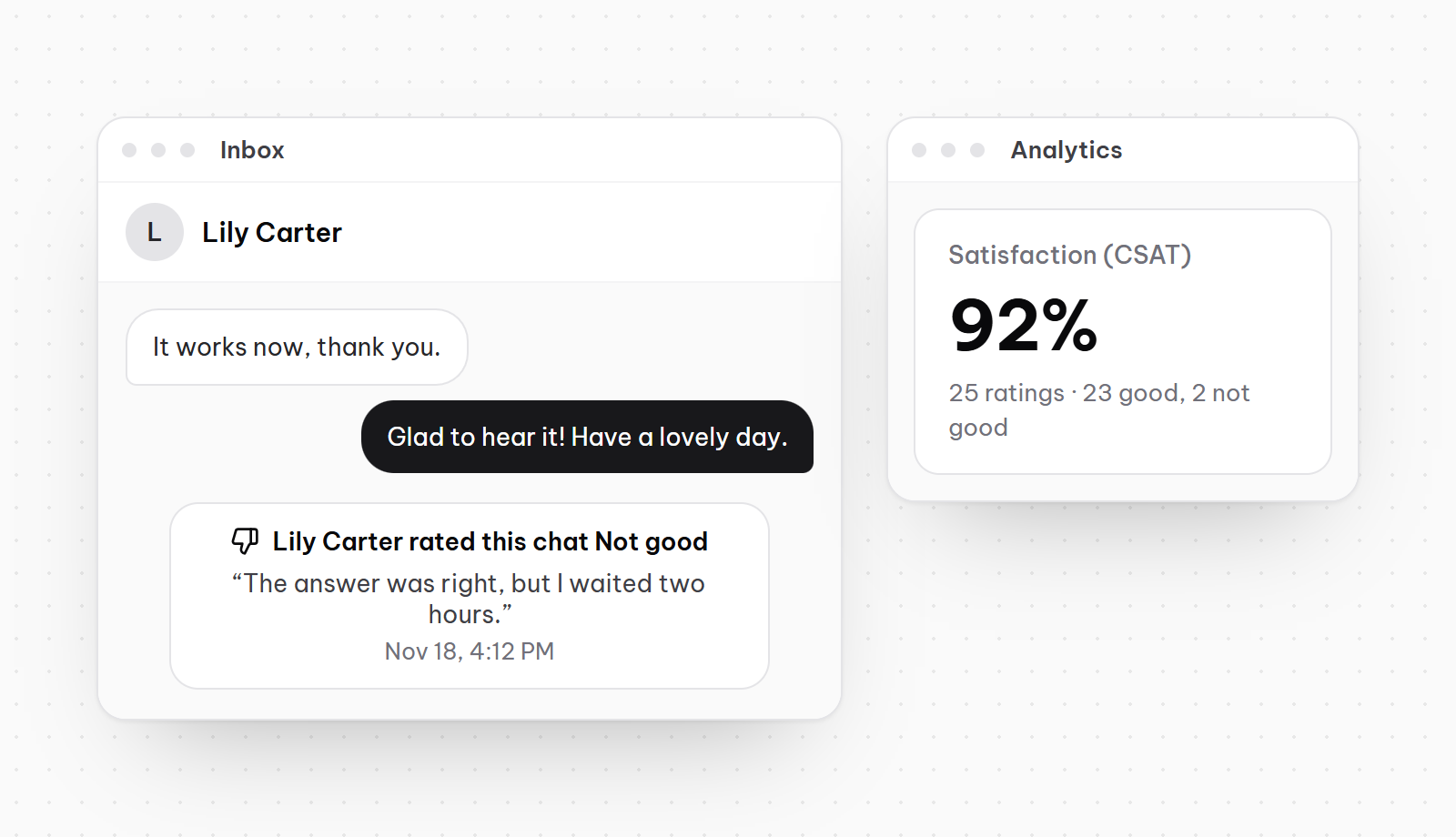
In Agent performance, each rating counts for the teammate the chat is assigned to. How far back you can look follows your plan: 7 days on Free, up to 365 days on Business. The guide to reading your reports explains the other numbers on that page.
What to do with a thumbs down
A "Not good" with a comment is often the most useful message of the week. Here is a simple routine that fits a small team:
- Open the chat and read it from the visitor's side. Often the answer was right but slow, or right but missing the one step they needed.
- If something is still unresolved, write back. Sending a message in a closed chat reopens it, and if the visitor has left the page and Heilo has their email, your reply reaches them by email too.
- If the same question keeps coming back, save the good answer as a canned reply, so everyone on the team gives it the same way.
- If the comment is about waiting, look at your first response time and the hours when customers write before changing anything else.
A thumbs up deserves a look too. It shows which answers to keep, and the comment sometimes names the exact thing that helped.
Turning it off, and a note for developers
The switch is in Websites & widget, on the website's Automation tab: Ask for a rating after the chat. Each website has its own, so you can keep it on for your main app and off for a small docs site.
If you'd like the ratings in your own tools, there are three ways in:
- The widget fires a
ratedevent on your page after the rating is saved, handy for your own analytics. - The
conversation.ratedwebhook (Pro and up) arrives on every real change to the score or the comment. The webhooks guide shows the payload. - If you built your own chat screen with the Chat SDK,
chat.rate()sends the same rating from your app.
Heilo('on', 'rated', ({ score, comment }) => {
  // score is 'good' or 'bad', comment can be null
  console.log('Chat rated', score, comment)
})
If your team already gets new chat alerts in Telegram, Slack, Discord or Teams, you can tick After-chat ratings in the same place, so a thumbs down reaches you where you already talk.
To see it for yourself, start a chat from your website's test page, close it in the Inbox, and rate it from the widget. It takes a minute and shows you exactly what your visitors see.