Canned replies with images for the questions you get every day
Save the answers you type every day, with screenshots and files attached, and insert them in the Inbox with a slash and a shortcut. On every plan.
收件箱和团队3 分钟阅读
A few weeks after launch, you'll notice the same questions coming back. How do I reset my password? Why does export to PDF fail? Which plan has what? How do I invite a teammate? Typing the answer again each time is slow, and once a teammate joins, two versions of the same answer start to drift apart.
Canned replies fix that. In Heilo they're called Canned responses: you save an answer once, with screenshots or a PDF guide attached if it helps, and insert it in any chat by typing / and a short shortcut. They're on every plan, Free included.
Save an answer once
Go to Settings, open the Canned responses tab and press Add canned response. Each one has four parts:
- Shortcut: what you type after
/. Letters, numbers,-and_, likeresetorexport-pdf. - Title: a short name, so it's easy to find in the list.
- Message: the text, with variables if you want them (more on that below).
- Images and files: up to 10 per reply. Use the Add images or files button, drag and drop, or paste a screenshot straight into the message box.
Owners and admins manage the list, and everyone on the team can use it. A workspace can hold up to 500 canned replies, so there's plenty of room to grow.
A small set to start with, for a notes app like Notely:
| Shortcut | What it answers |
|---|---|
/reset | Forgot password, with a screenshot of the sign-in page |
/pdf | Export to PDF fails, with a short PDF guide attached |
/plans | Which plan has what |
/refund | How refunds work |
/invite | How to invite a teammate, with two screenshots |
Use it in the Inbox
Type / in the reply box, or press the Canned responses button next to it. The list filters as you type, matching the shortcut, the title or the text. It also ignores Vietnamese accents, so /dia finds a reply titled "Địa chỉ". Use the arrow keys to pick one and Enter or Tab to insert it.
The reply goes into the box, not straight to the customer. Its variables are already filled in and its saved images and files attach themselves, so you only adjust a word or add a line before you send.
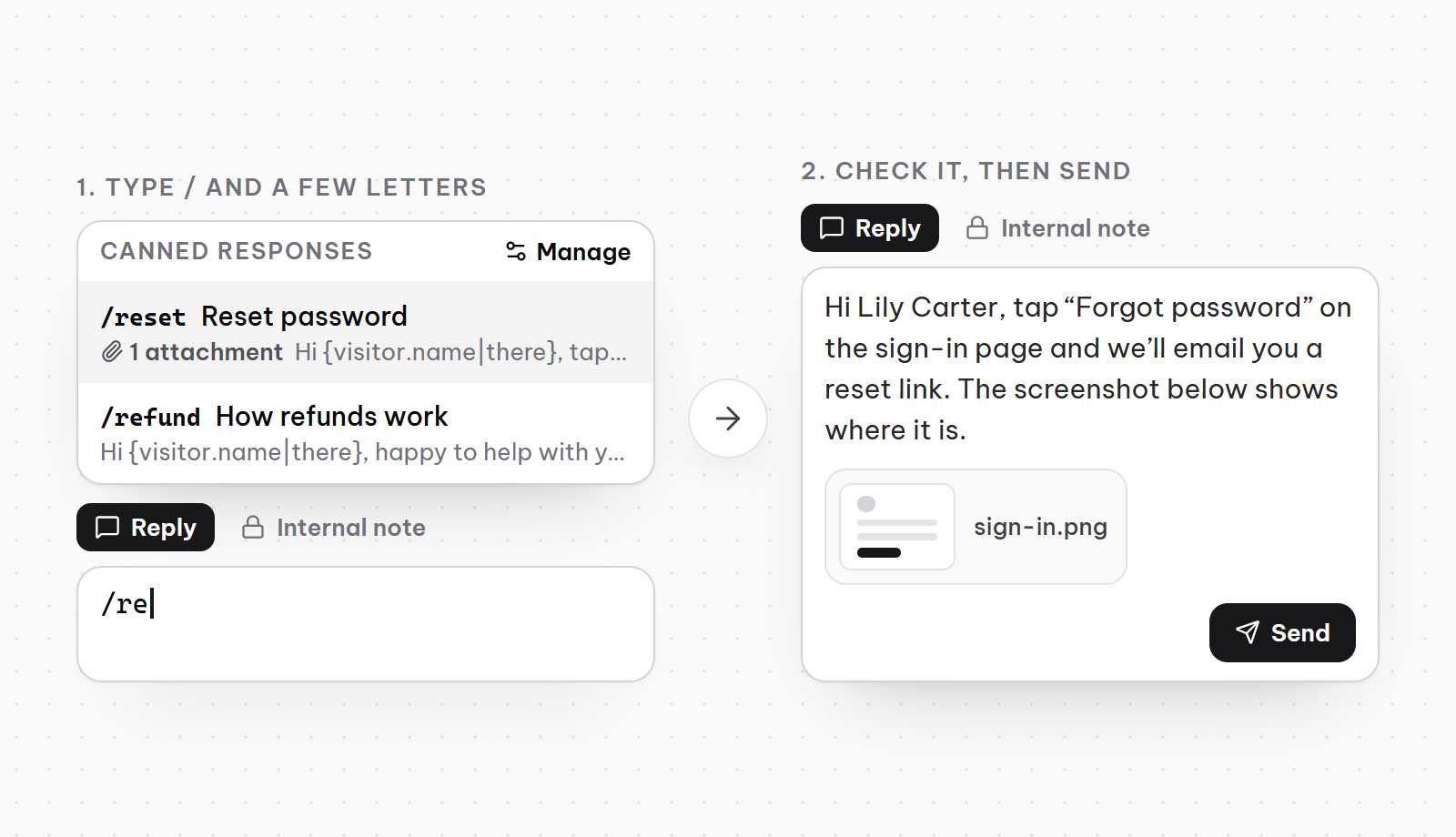
The same shortcut works in internal notes, when you want to share a standard answer with a teammate.
Variables that read naturally
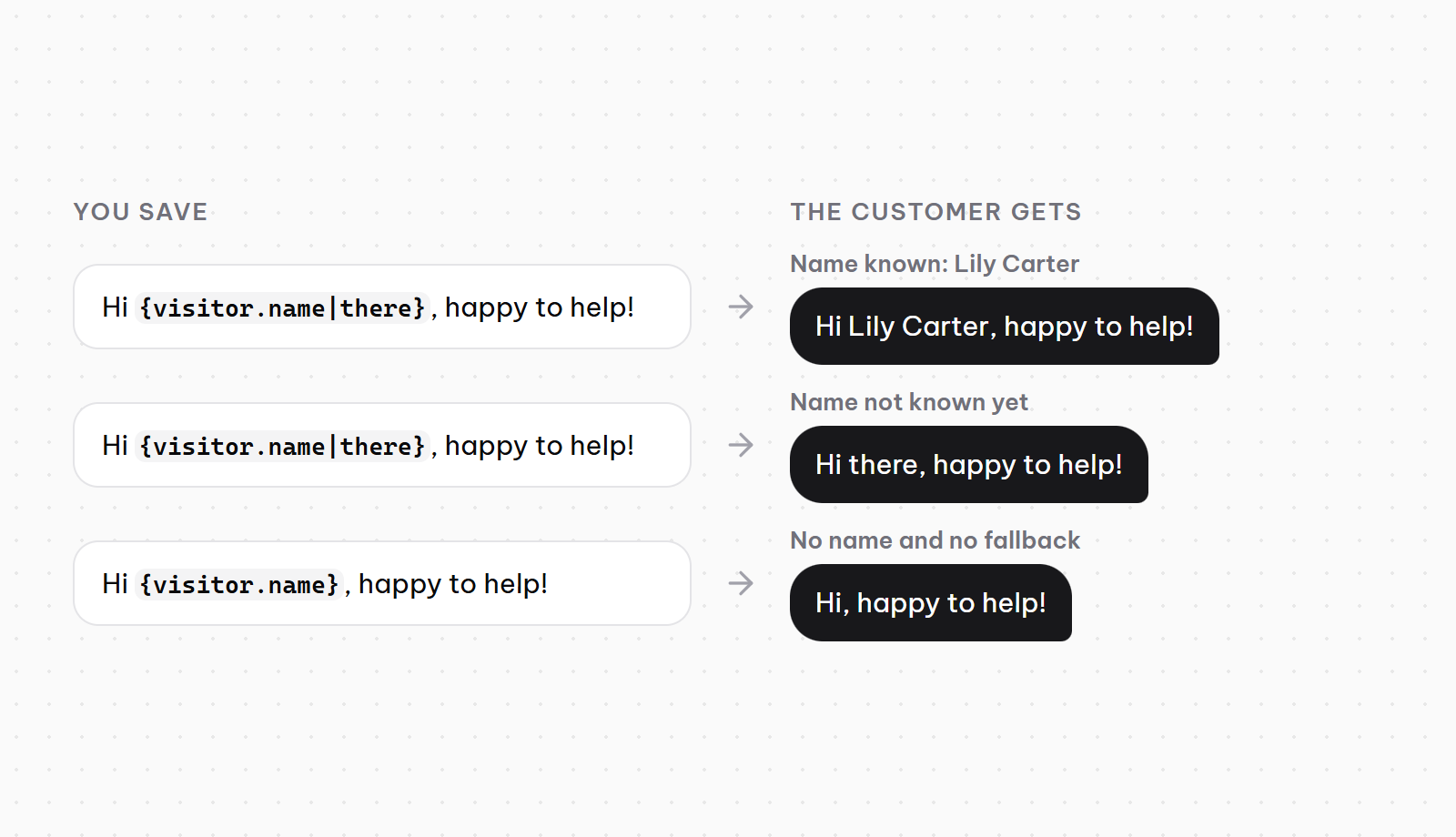
Two variables fill in when you insert a reply: {visitor.name} for the customer's name and {agent.name} for yours. When the name might be missing, add a fallback after a vertical bar, like {visitor.name|there}.
Hi {visitor.name|there}, tap "Forgot password" on the sign-in page and we'll email you a reset link. The screenshot below shows where it is.

{agent.name}, Notely
If the name is unknown and there's no fallback, the variable disappears together with the space before it, so "Hi {visitor.name}, ..." becomes "Hi, ..." and never "Hi , ...".
Why the images matter
For a lot of questions, one screenshot with a circle around the right button saves three messages. Customers can usually send you a screenshot. The harder part is often the other way around: in many tools, the support side can't send an image back without upgrading. In Heilo, images and files go both ways on every plan, and a canned reply can carry them.
A few details worth knowing:
- A reply can be images only. A screenshot of the settings page with no text at all is fine.
- The files are reused, not copied. Every time you send the reply, it points to the same saved file, so a reply you send a hundred times takes the room of one.
- The cleanup on the File storage page, which can delete old chat files to free up room, never removes files saved in a canned reply.
If you'd like to go further, the post on sending images and files both ways covers file kinds and sizes per plan, and replying to a specific message helps when one customer asks three things at once. For questions that need a teammate's eye before you answer, internal notes and @mentions keep that talk inside the chat.
The three questions you answered most this week are a good place to start.