Talk to your team inside the chat with notes and @mentions
Internal notes and @mentions let your team talk about a customer's question right inside the conversation. The customer never sees them. Every plan.
收件箱和团队4 分钟阅读
Some questions need a second pair of eyes before you answer. A customer writes that export to PDF fails on her longest notes, and you want to check with the teammate who built that part. Or you're handing a chat over for the evening and want the next person to know what you already tried.
The usual fix is a side conversation in another app, with screenshots of the chat pasted in. It works, but the context ends up in two places. In Heilo your team talks inside the conversation: an internal note sits next to the customer's messages, only your team sees it, and an @mention brings in the right person. Both are on every plan, Free included.
Write a note next to the messages
The reply box in the Inbox has two tabs, Reply and Internal note. Switch to Internal note and the box turns a soft yellow, so you always know which mode you're in. Type, press Enter (or Add note), and the note lands in the thread at the moment you wrote it, in the same yellow, so nobody reads it as a reply.
A note stays inside Heilo. It's never sent to the visitor, and it never goes out to Messenger or Instagram when the chat came from there. It also stays out of your numbers: a note doesn't change the first response time, the unread count or the preview in the conversation list. You can attach a screenshot or a file to a note, and / brings up your canned replies here too.
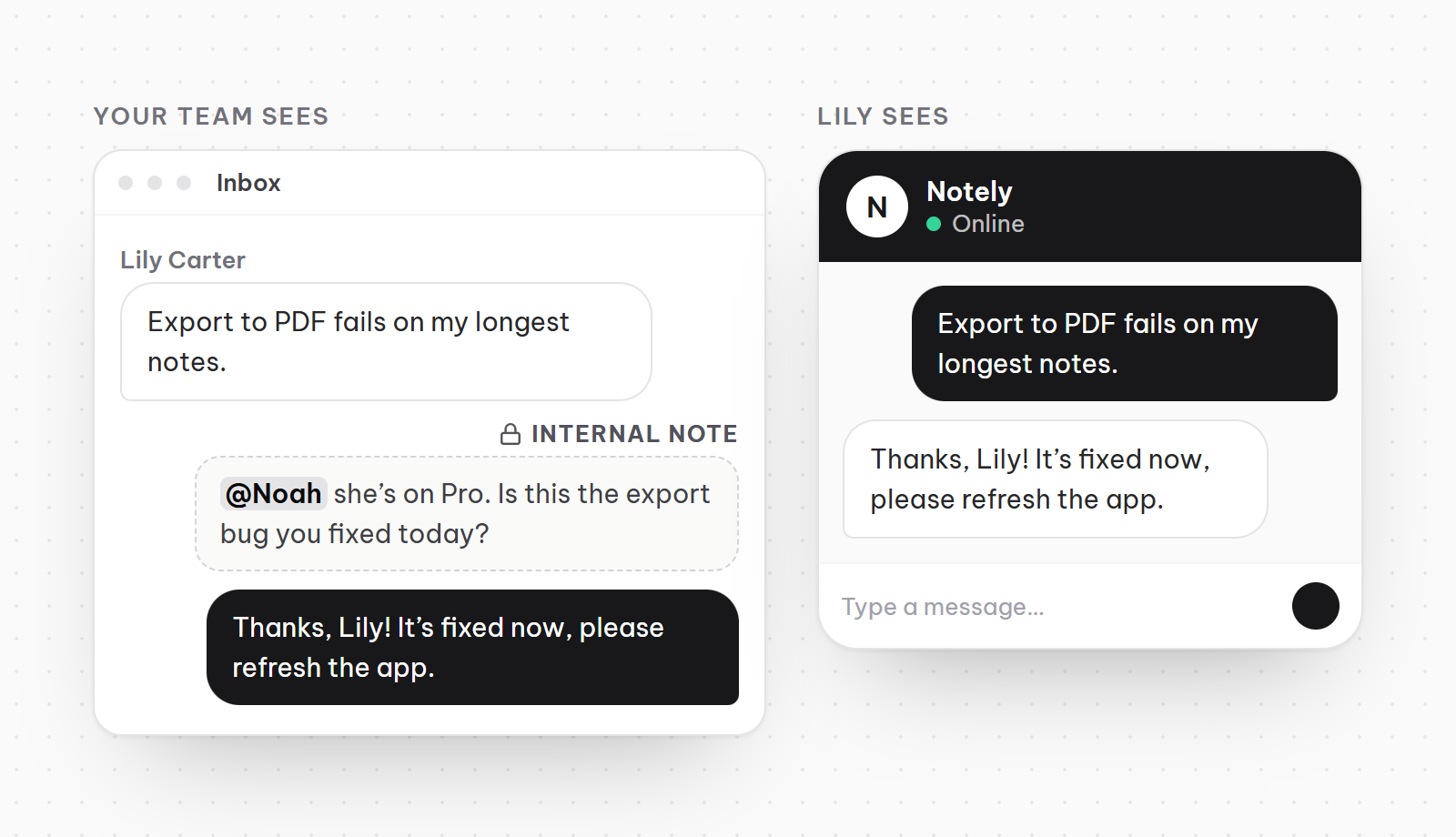
A good note is whatever the next person would otherwise have to ask about:
- "Lily is on Pro. Export fails only on notes over 50 pages."
- "Asked for her browser version, waiting for an answer."
- "Promised her an update by tomorrow noon."
Bring a teammate in with @
In a note, type @ and Heilo lists your teammates, with a dot next to the ones who are online. Keep typing to narrow the list, use the arrows and press Enter. Accents don't matter, so @duc finds Đức. If you prefer the mouse, the Mention a teammate button does the same.
What the teammate gets depends on where they are:
- In the dashboard: a small pop-up with the note and an Open button that jumps straight to the chat, with a sound unless they muted it. If the Heilo tab is in the background and browser notifications are on, a notification shows up too.
- Not in the dashboard: an email that says who mentioned them and in which conversation. To keep a busy thread from filling their inbox, Heilo sends at most one mention email per conversation and person every 5 minutes.
Mentions belong to notes on purpose. In the Reply tab, @ is just a character, so a customer never receives a mention meant for your team.
Notes on the chat, notes on the person
Heilo has two kinds of notes, and they do different jobs.
The internal note in the reply box is about this conversation: the question, what you tried, who's on it. It lives in the timeline, at the moment you wrote it.
The notes on a contact are about the person, and they follow them from chat to chat. You find them in the Inbox sidebar under the visitor's details, and on their profile on the Contacts page. That's the place for things that stay true: "Prefers email", "Uses Notely on Android and the web", "Beta tester since launch".
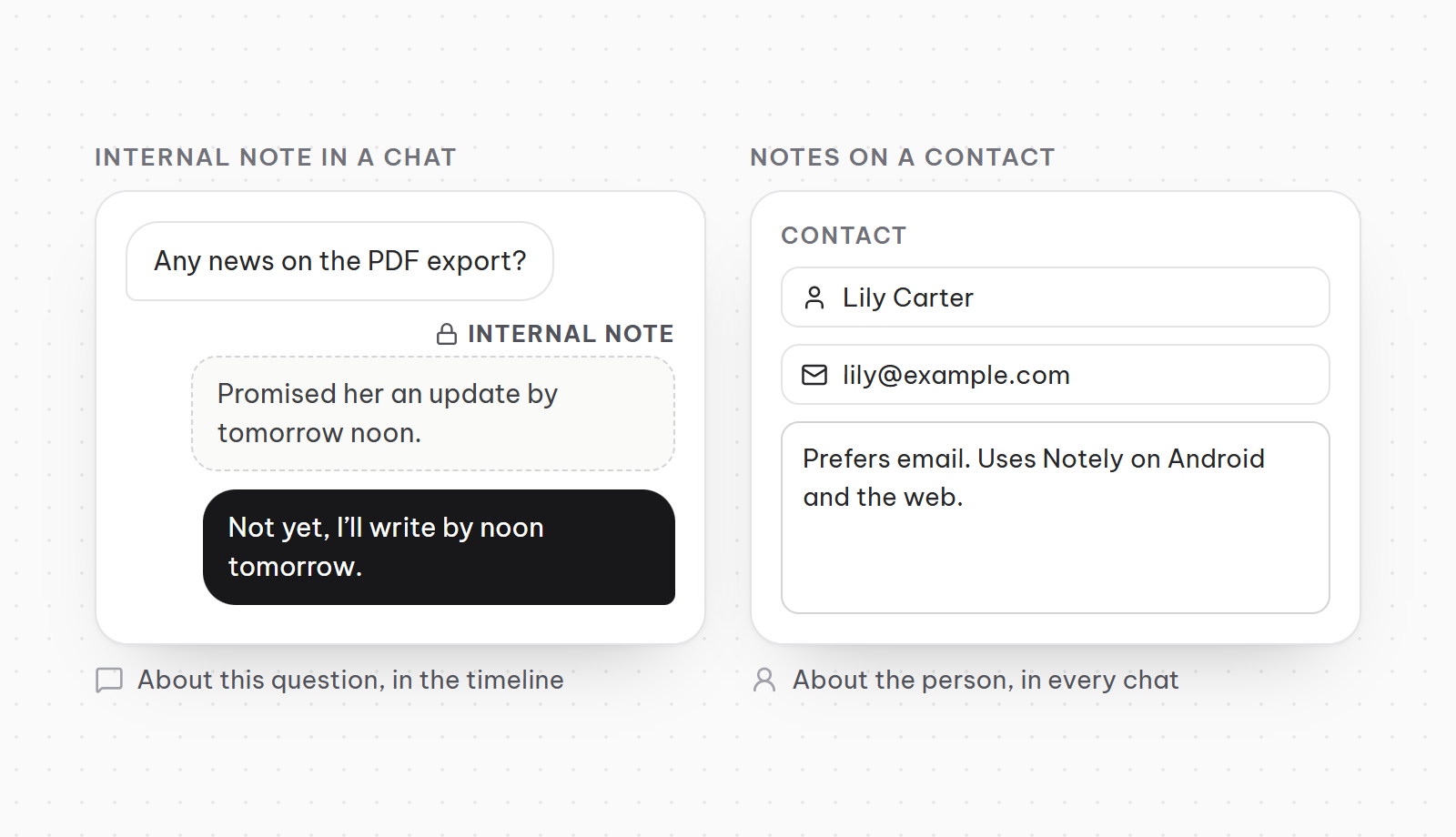
| Internal note in a chat | Notes on a contact | |
|---|---|---|
| Where | Reply box, Internal note tab | Inbox sidebar and contact profile |
| About | This question, a handover | The person, across chats |
| @mentions | Yes | No |
| Who sees it | Your team only | Your team only |
Hand over without losing the thread
Notes work best as a few small habits rather than rules. These help a small team most:
- Before you assign a chat to someone else, leave one note: what the customer wants, what you tried, what's left.
- When you promise something (a fix, a call back, a refund), write it down, so the next person doesn't promise something different.
- If the work will take days, turn it into a ticket. Ticket comments are internal too, and the ticket keeps its own history.
You can quote a note with Reply, like any other message. Replying to a note switches the box to Internal note by itself, so a note is never quoted to a customer. There's more on quoting in reply to a specific message.
If your team answers the same questions every day, canned replies go well with notes: / works in both tabs.