Visitor behavior: see where visitors went on your website
Heilo's Visitor behavior page shows where people come from, which pages they read, how long they stay, when they come and what they saw before writing to you.
Customers & data5 min read
The Visitors online page shows who is on your website right now. But most of the time you aren't watching it. You're coding, sleeping or answering another chat. People drop by, read a few pages and leave, and there is no way to look back at what they did.
The Visitor behavior page fills that gap. Heilo keeps every visit on the pages that have your chat widget and turns them into one page that's easy to read: where people come from, which pages they read, how long they stay, when they usually come, and what they saw before writing to you. It's on the Pro and Business plans, and open during the 14-day free trial.
Here's each part of the page, how Heilo counts, and a few small things you can do with the numbers.
Where to find it
Open Visitor behavior in the sidebar, right under Analytics. At the top you pick a date range (7, 30, 90 days or 1 year) and, if you run more than one website, filter by website. Pro looks back 90 days, Business a full year.
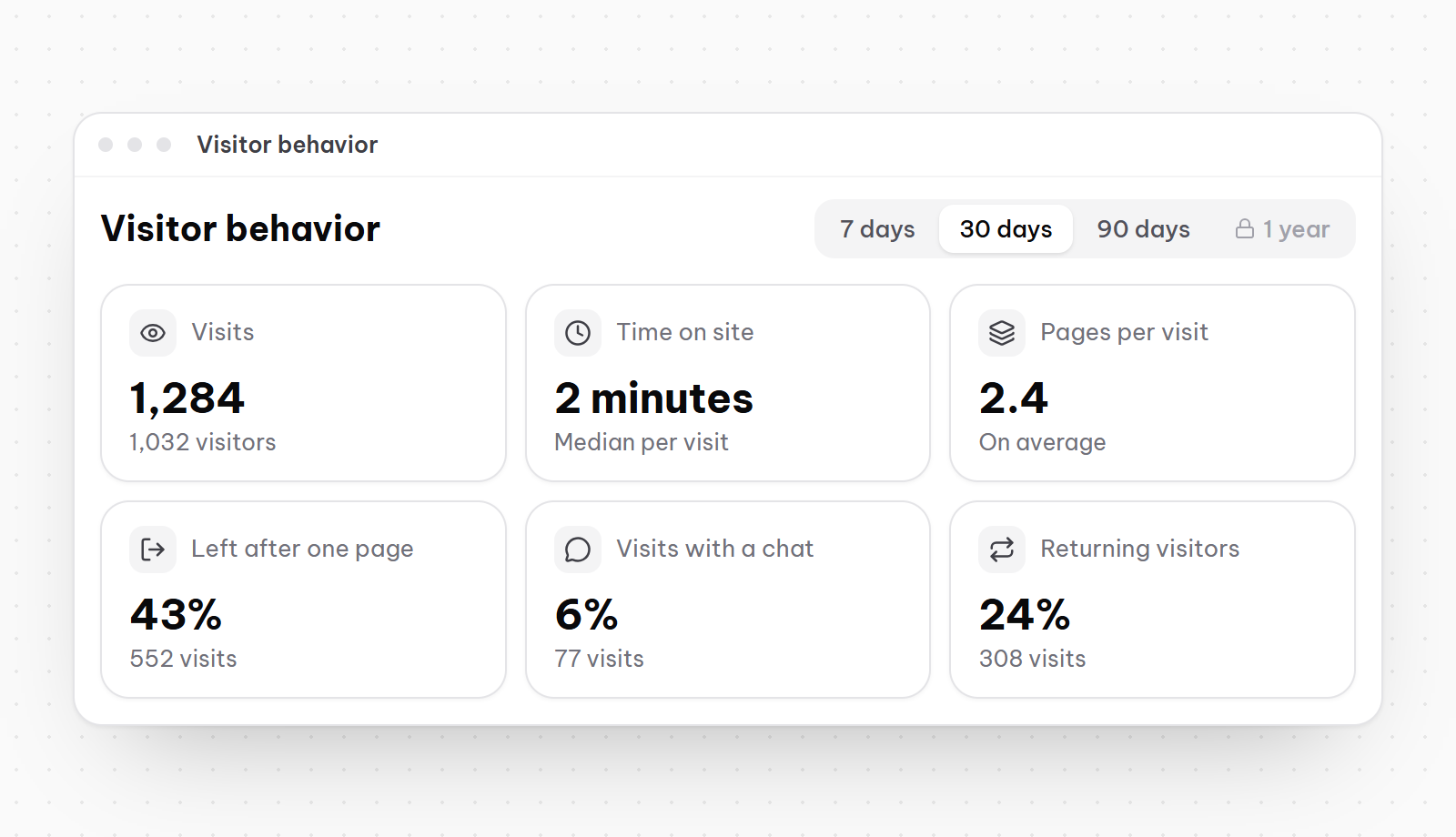
The six tiles at the top:
- Visits, with the number of different visitors in the period.
- Time on site: the median visit. Heilo counts up to the last time the visitor was active (scrolling, moving the mouse, typing), so a tab left open all afternoon doesn't push it up.
- Pages per visit: how many pages a visit opens, on average.
- Left after one page: visits that saw a single page and left.
- Visits with a chat: the share of visits in which someone wrote to you.
- Returning visitors: visits from people who had been here before.
Below them you get visits per day, and next to it devices (computer, phone, tablet) and new versus returning visitors, each with the share that chatted.
When visitors come
When visitors come is a heat map: seven rows for the days of the week, twenty-four columns for the hours, in your own time zone. The darker a cell, the busier that hour. Hover a cell to read it, or click the map and use the arrow keys. The line under it names the busiest hour.
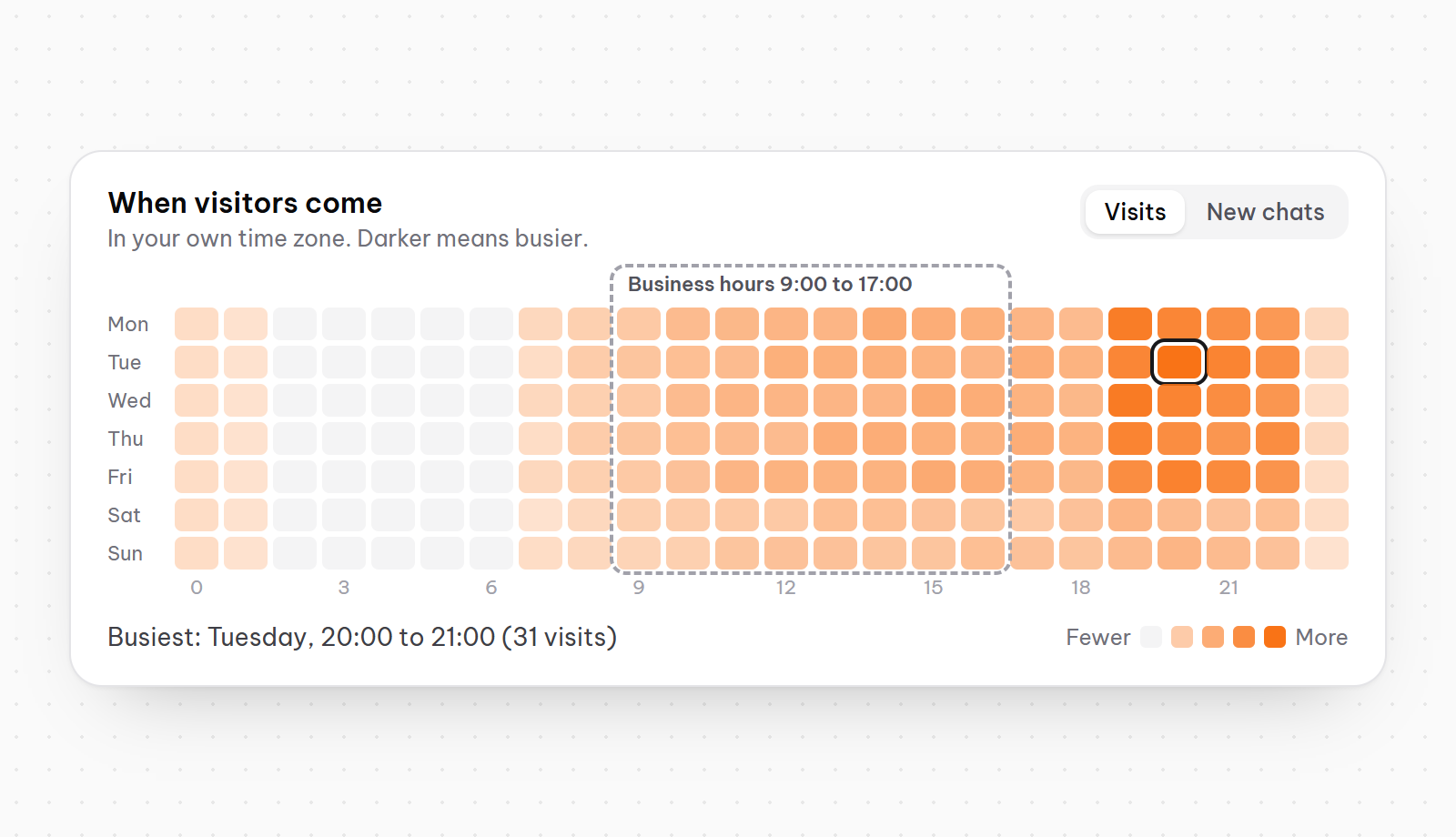
The New chats button switches the map to the hours when chats begin. That part comes from the chats you already have, so it has numbers even for the weeks before Heilo started keeping visits.
Putting the two maps side by side usually points to one concrete change. If visitors come at 20:00 and you're online until 17:00, you could move your online hours to the evening a few days a week, or let the AI assistant answer while you're away. The post on business hours and online status shows how to set it up.
Which pages bring people in, and which keep them
The Pages table has four tabs:
- Most viewed: the pages with the most views, with the number of visitors and the average time on the page.
- Landing pages: the first page of a visit. Often the home page, a blog post, or the page your campaign links to.
- Exit pages: the last page before people leave, with the share of the page's views that ended there.
- Where chats begin: the page people were on when they sent their first message.
A page with plenty of views, a high exit rate and almost no chats is often a place where people look for an answer the page doesn't give yet. A page where chats often begin is a good spot for an invite above the chat button with a question about that page.
Time on a page runs until the visitor opens the next page, or until the last time they were active. A page left open for more than 30 minutes counts as 30, so a few forgotten tabs don't skew the table.
What people read before they write
This part tends to be the most useful while your product is young. For visits with a chat, Heilo shows how long people took to write after arriving (the median), how many pages they had seen on average, and which pages they read before their first message.
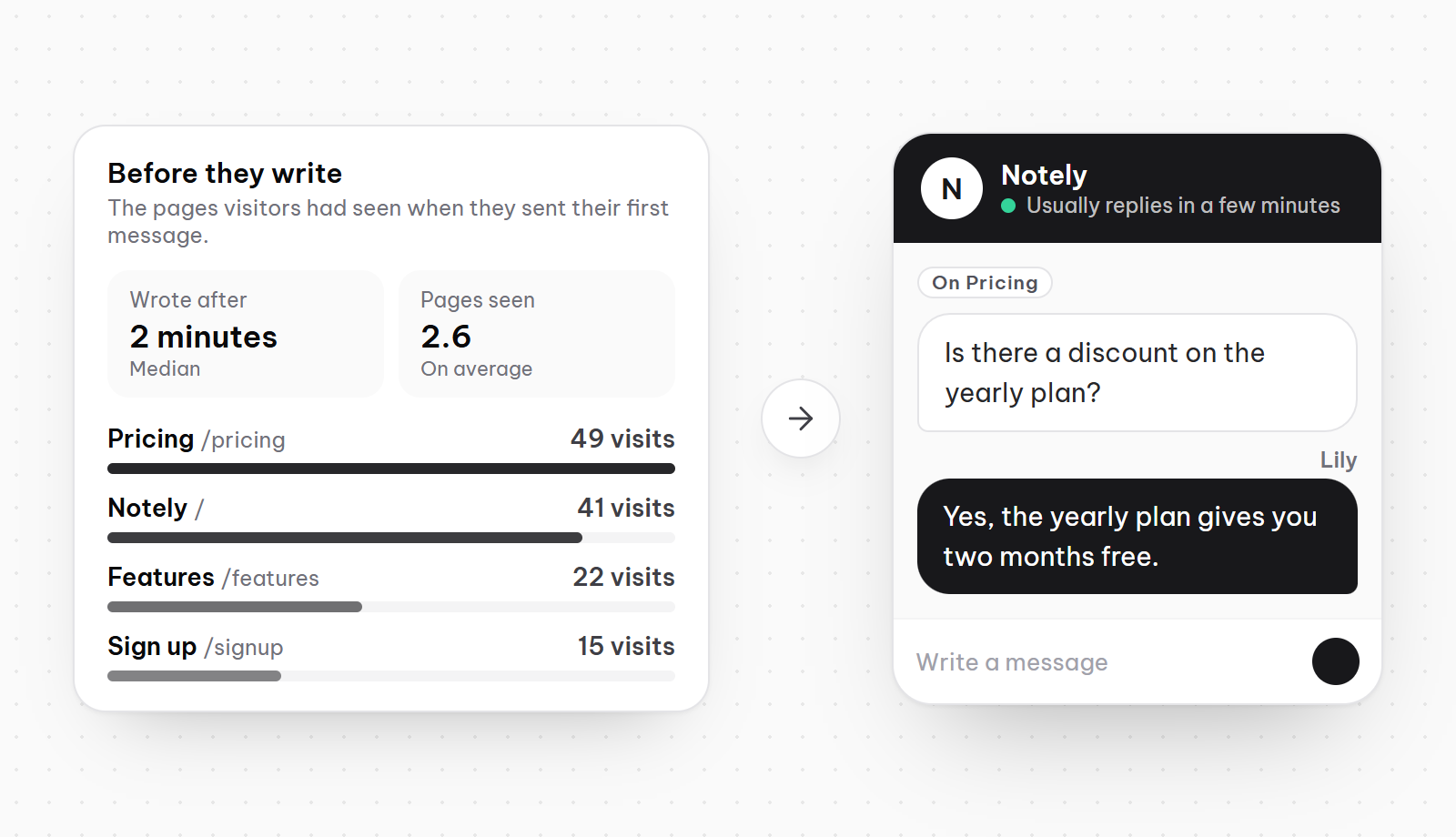
Take Notely, a note-taking app run by Lily Carter. Lily sees that almost two thirds of the people who write had read the pricing page, that they write after about two minutes, and that the questions keep circling the yearly plan. So Lily adds a line about the yearly plan right on the pricing page and puts the answer into the AI assistant's knowledge base. In the following weeks that question comes up far less, and the chats that remain are the ones that really need Lily.
Next to it, Common paths lists the first three pages of visits that went past one page, such as Home, then Features, then Pricing, with how many of those visits chatted.
Where visitors come from
Where visitors come from puts each visit under one source:
- If the link had a
utm_sourcetag, the source is that tag. Campaign names (utm_campaign) get their own list below. - Otherwise it's the site that linked to you. Well-known sites such as Google, Facebook, LinkedIn or ChatGPT are grouped under one name, whichever version of the site the visitor came from.
- With neither, it's Direct: someone typed your address, used a bookmark, or came from an app that doesn't send a referrer.
Each source shows the share of visits that chatted. A source that brings few visitors but many chats is often where the people who really care are, and a good place to share more. At the bottom of the page you'll find countries, also with the share that chatted.
What Heilo keeps, and what it doesn't
- Heilo only records pages that have the chat widget, once the widget has connected. If your website waits for cookie consent, Heilo starts recording when the visitor agrees, or when they open the chat themselves.
- Page addresses are stored without query strings, except
utm_tags. The referring page keeps only its domain and path. - Heilo doesn't record mouse positions or clicks, and it doesn't read what visitors type on your pages. The heat map here is about hours of the week, not spots on a page.
- Each visit is kept for 13 months, then deleted. Deleting a website deletes its visits too. The details are in the privacy policy.
- Heilo records visits on every plan, Free included, so when you move to Pro the weeks before are already there. Recording started on November 22, 2026, so before that date the page only has chat hours.
Getting started
There's nothing to install: once the widget is on your website, Heilo keeps the visits. On Free or Starter, the Visitor behavior page shows a preview, and it opens as soon as you switch to Pro.
For who is on your website right now there's Visitors online, and response times and after-chat ratings live in Analytics. Read together, the three pages give you a fairly full picture of the people who drop by your product.